A first-of-its-kind solution in the academic market: students analyze their own behavior
OperantLab
Behavior Analysis in the digital age

A groundbreaking platform for teaching Experimental Behavior Analysis.

OperantLab recreates the classic experiments used in the undergraduate Psychology program for the Experimental Behavior Analysis course. The key difference is that, instead of studying the basic principles of behavior in a real or virtual rat, the student takes part as the experimental subject. By going through the very same procedures — such as reinforcement, extinction, conditioned reinforcement, discrimination and generalization — they build the graphs from data on their own behavior, analyze them and observe the principles of operant behavior happening within themselves.

Going beyond the classic laboratory, the platform also lets the teacher create custom experiments. This way, the student learns to manipulate variables in studies with human beings, investigating the dynamics of verbal and non-verbal behavior.

Historical context

Ethics, Laws and Costs in Teaching Experimental Behavior Analysis

For decades, the study of operant conditioning relied on animals in the laboratory. Over time, laws such as the Health Research Extension Act (USA, 1985) and Brazil's Lei Arouca (Law No. 11,794/2008) established mandatory ethics committees — IACUC and CEUA — for any research involving animals. Approvals began taking months, operational costs rose, and access to animal behavior laboratories moved out of reach for most institutions.

In 1994, Sniffy the Virtual Rat emerged as an alternative: no animals, no bureaucracy. Sniffy evolved through its most recent version in 2011, offering 47 practical exercises. But the limitation remains — behavior is generated by algorithm, not by a living organism. The data are not real.

OperantLab™ solves this. Developed by an instructor with 25 years of teaching Experimental Behavior Analysis20 years with real rats, 4 years with the virtual rat — the software is born from the hands-on experience of someone who knows both realities. Using figures as visual stimuli, it collects responses from real human participants — no CEUA or IACUC required, no vivarium costs, with genuine operant behavior data. In a computer lab or online research setting, real results with full legal compliance.

What is OperantLab™

Not a simulator. An experimental chamber.

A simulator mimics a real system. OperantLab™ does not mimic anything — it is the experimental environment, generating valid data for Behavior Analysis research.

01

Skinner Box for humans

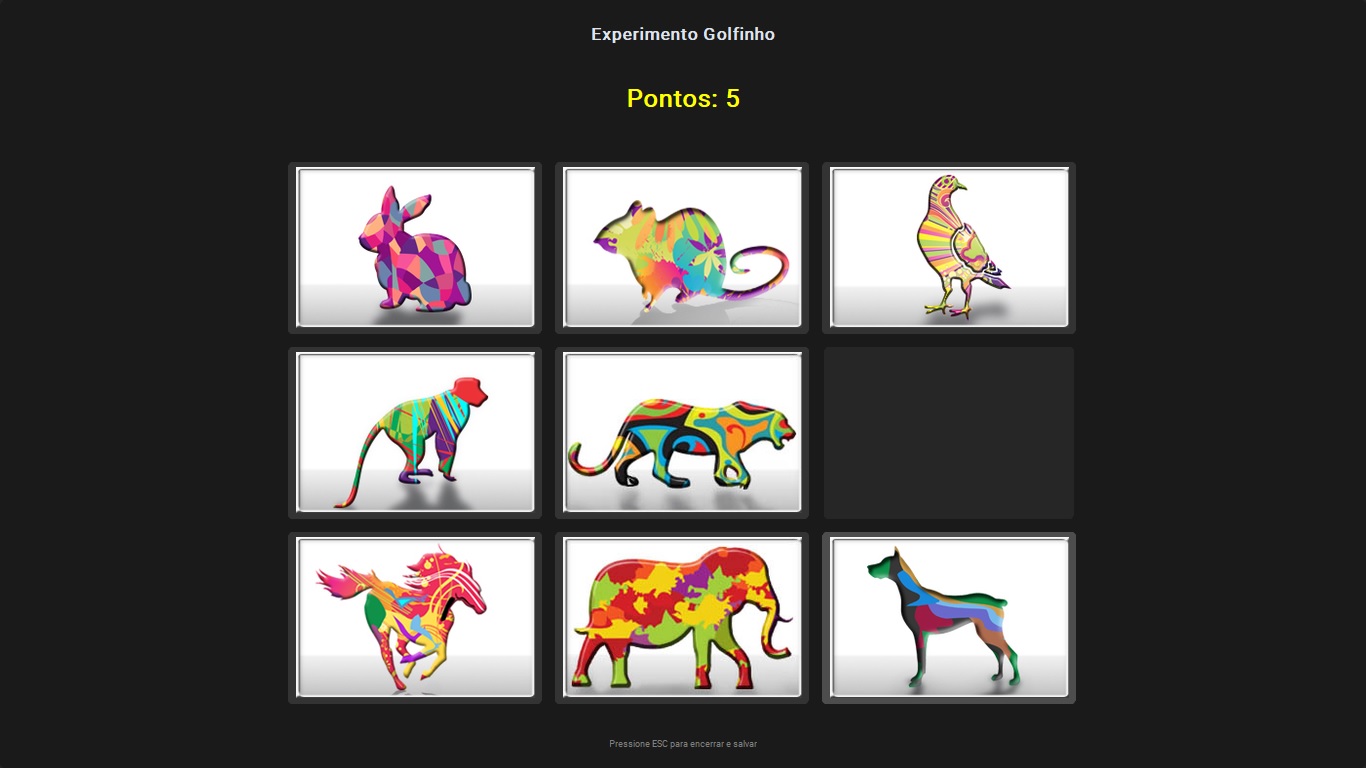
Participants interact with a 3×3 grid of figures. Each click is an operant response — and the software delivers or withholds reinforcement according to the schedule configured by the instructor.

02

Real data collection

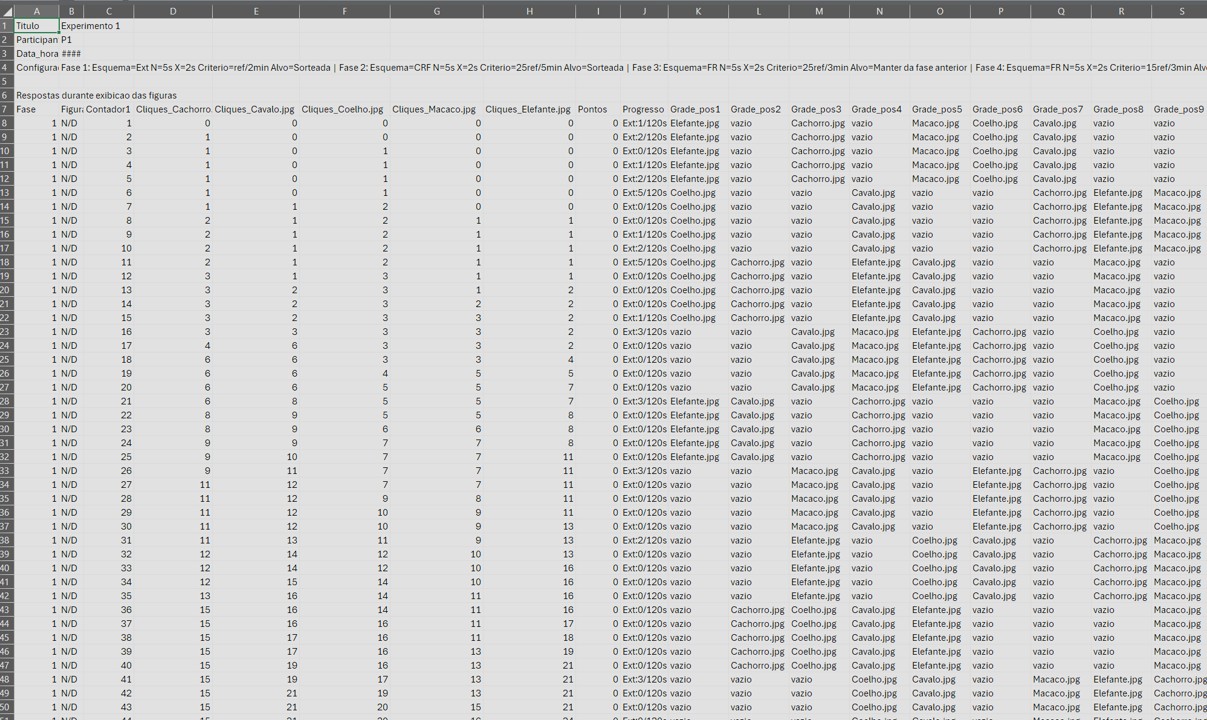
Each session generates a CSV file with experiment configuration, responses per second, clicks per figure, latencies, reinforcements and text responses between phases. Ready for Excel or statistical analysis.

03

From theory to demonstration

Acquisition, extinction, stimulus control, self-control, high rate in FR and low rate in DRL: classic Behavior Analysis concepts become visible to students in a 15-minute session.

+870 billion

unique configurations per experiment — combining 11 reinforcement schedules, independent numerical parameters, and custom visual stimuli. Every protocol you create is a genuinely new experiment.

Download OperantLab™
Who it is for

Built for Psychology programs and research laboratories.

01

Behavior Analysis Courses

Instructors configure didactic experiments — FR, DRL, extinction, fading — and students run them in class, with real data collection for discussion.

02

Experimental Research Laboratories

Researchers publish protocols for their participants and synchronize data across lab machines. Files are protected on the server with AES-256-GCM encryption — the key stays solely with the institution, unreadable by OperantLab.

03

Psychology and Behavioral Sciences Programs

Compatible with institutional computer labs — Windows 10/11 and Linux, no permanent internet connection required during sessions.

Features

Everything a Behavior Analysis course needs.

11 reinforcement schedules

CRF, FR, VR, FI, VI, FT, VT, DRL, DRH, Extinction and LAG — all with configurable parameters.

Real-time monitor

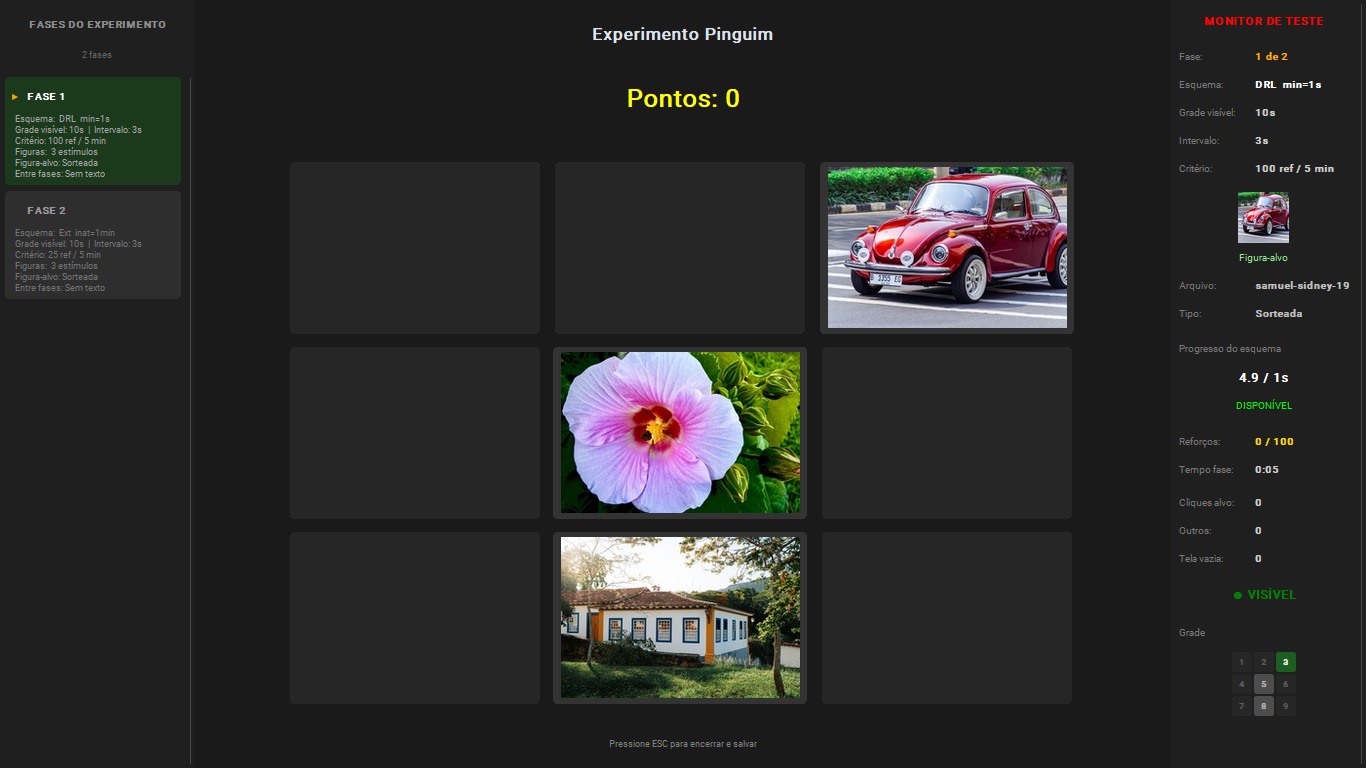
Pre-test panel shows clicks, reinforcements, progress, target figure thumbnail and grid state — all in real time.

CSV Data Export

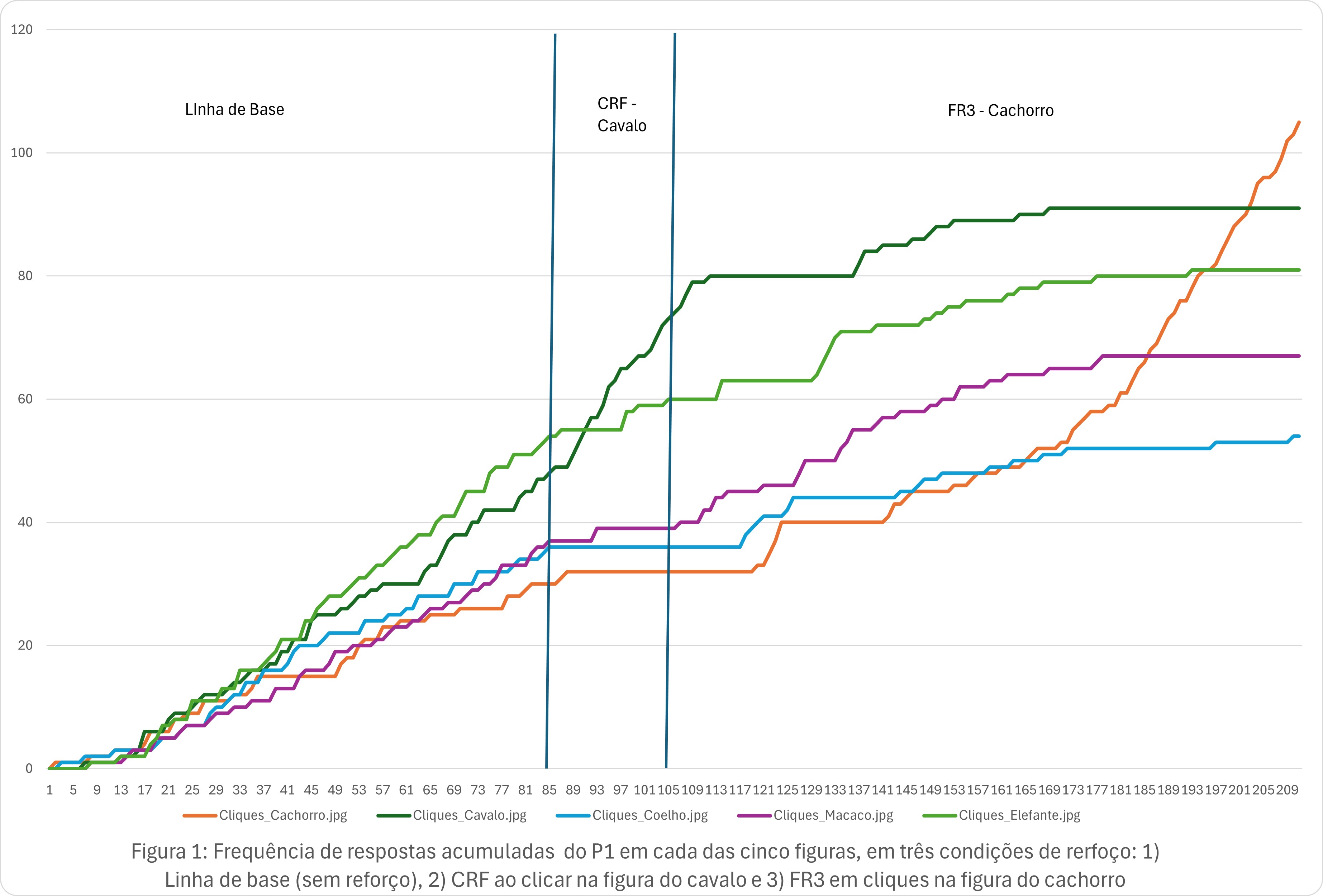
Cumulative Response Frequency record. Each session generates a CSV file with headers, configuration and three data sections — ready for Excel, R or SPSS.

Export / Import

Share complete experiments between machines with .oplab files — configuration and figures embedded.

Trilingual

Interface in Portuguese, English and Spanish — no barrier for international students or collaborations.

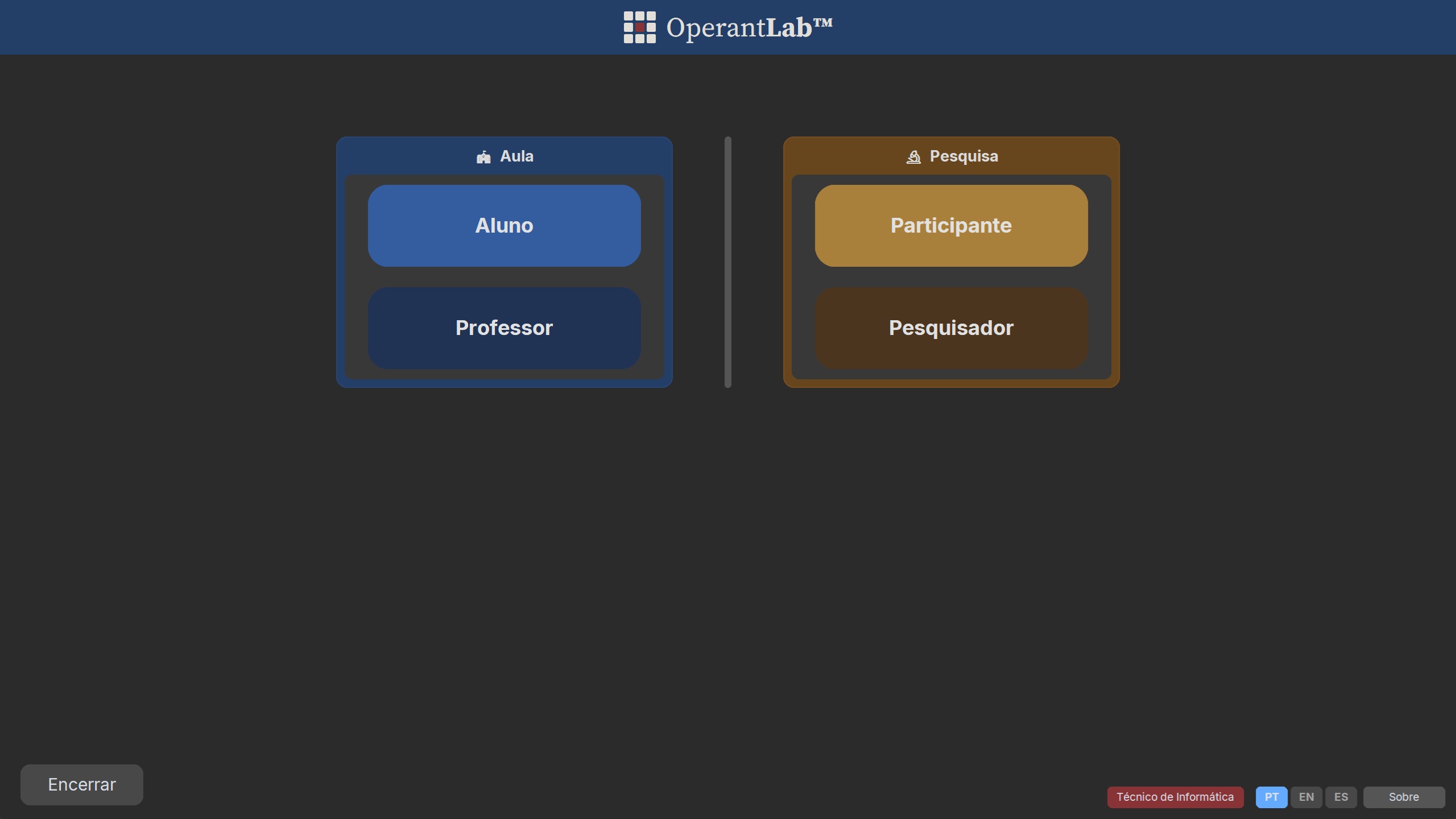
Four user roles

Teaching environment (Instructor + Student) and Research environment (Researcher + Participant) — independent, with no mutual interference.

Discrimination Training

Configure multiple stimulus figures with selective reinforcement to demonstrate discriminative learning and stimulus control development.

Generalization

Present stimulus variations after discrimination training to observe and quantify response generalization across similar stimuli.

Fading

Implement gradual fading procedures of prompts and auxiliary stimuli to transfer stimulus control in a programmed and systematic way.

Functional Stimulus Class

OperantLab™ cannot form a functional stimulus class, but it can be used to test whether a functional stimulus class has been established.

Rule Control

Implement instructions and rules as verbal discriminative stimuli to study how verbal behavior controls operant responses in varied contexts.

Self-Rule

Students and participants can write about their own rules during the session and/or feelings between phases.

Who it is for

Psychology programs that train behavior analysts.

Course Coordinators

Academic differentiation

Offer your students a laboratory experience other programs don't have. Experimental Behavior Analysis, Learning and Radical Behaviorism courses gain a real hands-on component, not merely a demonstration.

Instructors

Classes with real data

Configure an experiment in minutes. Run it with the entire class in the computer lab. Use the generated CSVs to discuss, in class, the acquisition curve, high rate in FR and low rate in DRL, or resistance to extinction — with your students' own data.

Researchers

Data collection at scale

Environment independent from Teaching. Allows the researcher (or graduate student) to build their own protocols and run data collection with participants without interfering with didactic material. Supports multiple phases, precise time control and automatic data export.

Schedule a demo on WhatsApp Download OperantLab™
The schedules

Eleven reinforcement schedules, all the classics.

Each phase of the experiment accepts one of the schedules below, with independent parameters and configurable completion criteria.

Code Name Description
CRF Continuous Reinforcement Each click on the target figure earns points.
FR Fixed Ratio Points after exactly N clicks on the target figure.
VR Variable Ratio Points after a variable number of clicks (mean N).
FI Fixed Interval Points on the first click after a fixed interval of N seconds.
VI Variable Interval Points on the first click after a variable interval (mean N s).
FT Fixed Time Automatic points every N seconds (no click required).
VT Variable Time Automatic points at variable intervals (mean N s).
DRL Differential Reinforcement of Low Rates Points if the inter-click interval exceeds N seconds.
DRH Differential Reinforcement of High Rates Points if N clicks occur within a time window.
Ext Extinction No click produces points; criterion: time or inactivity.
LAG Variability Reinforcement Points only when the click sequence differs from the N previous responses (LAG N). Reinforces behavioral variability as an operant dimension.
NEW — v1.5

Variability Reinforcement (LAG Schedule)

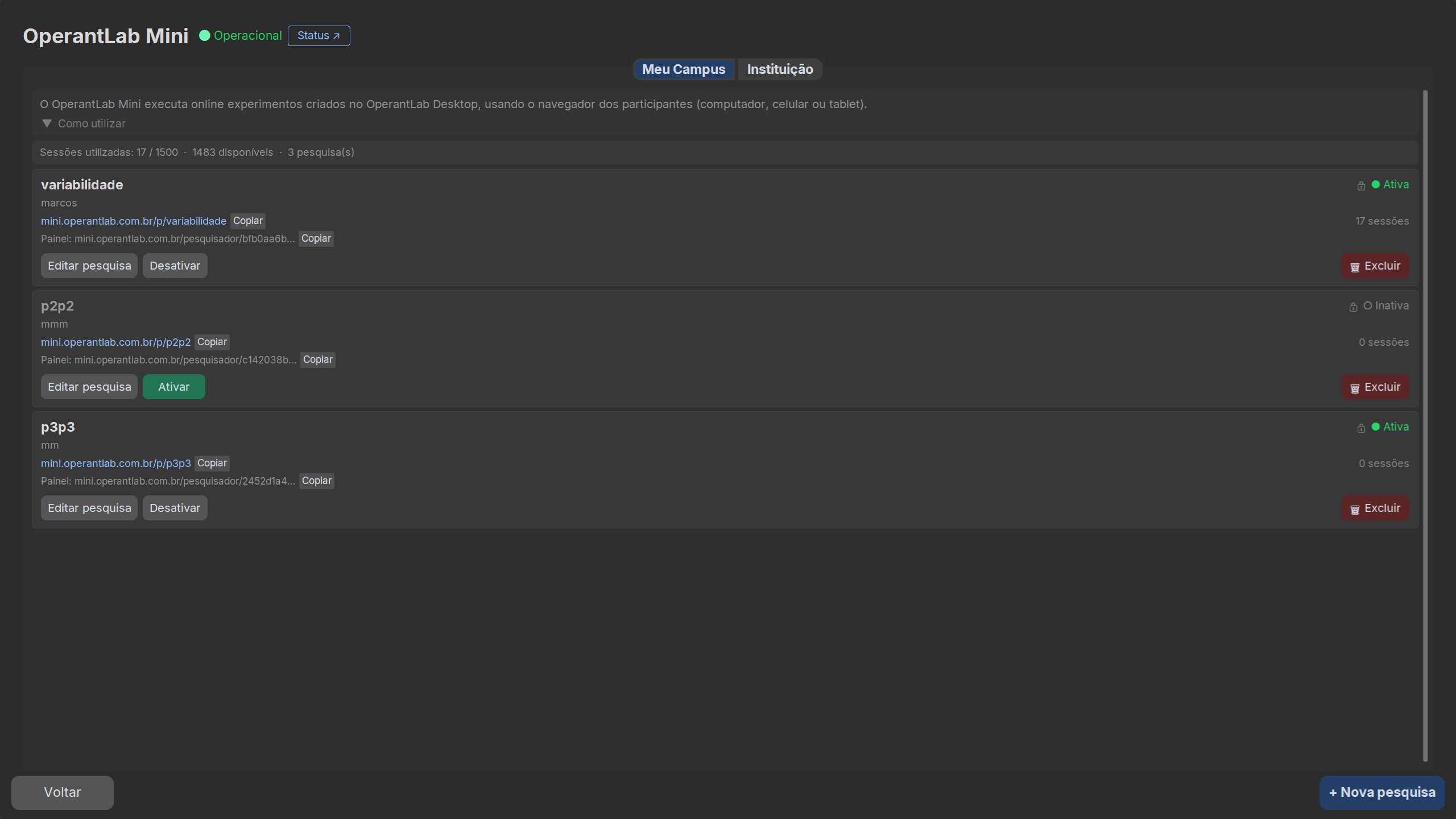
OperantLab now supports LAG reinforcement schedules, allowing students to observe and analyze the emission of novel responses. Configure differentiation criteria and see in practice how variability can be an operant dimension controlled by consequences.

Didactic examples

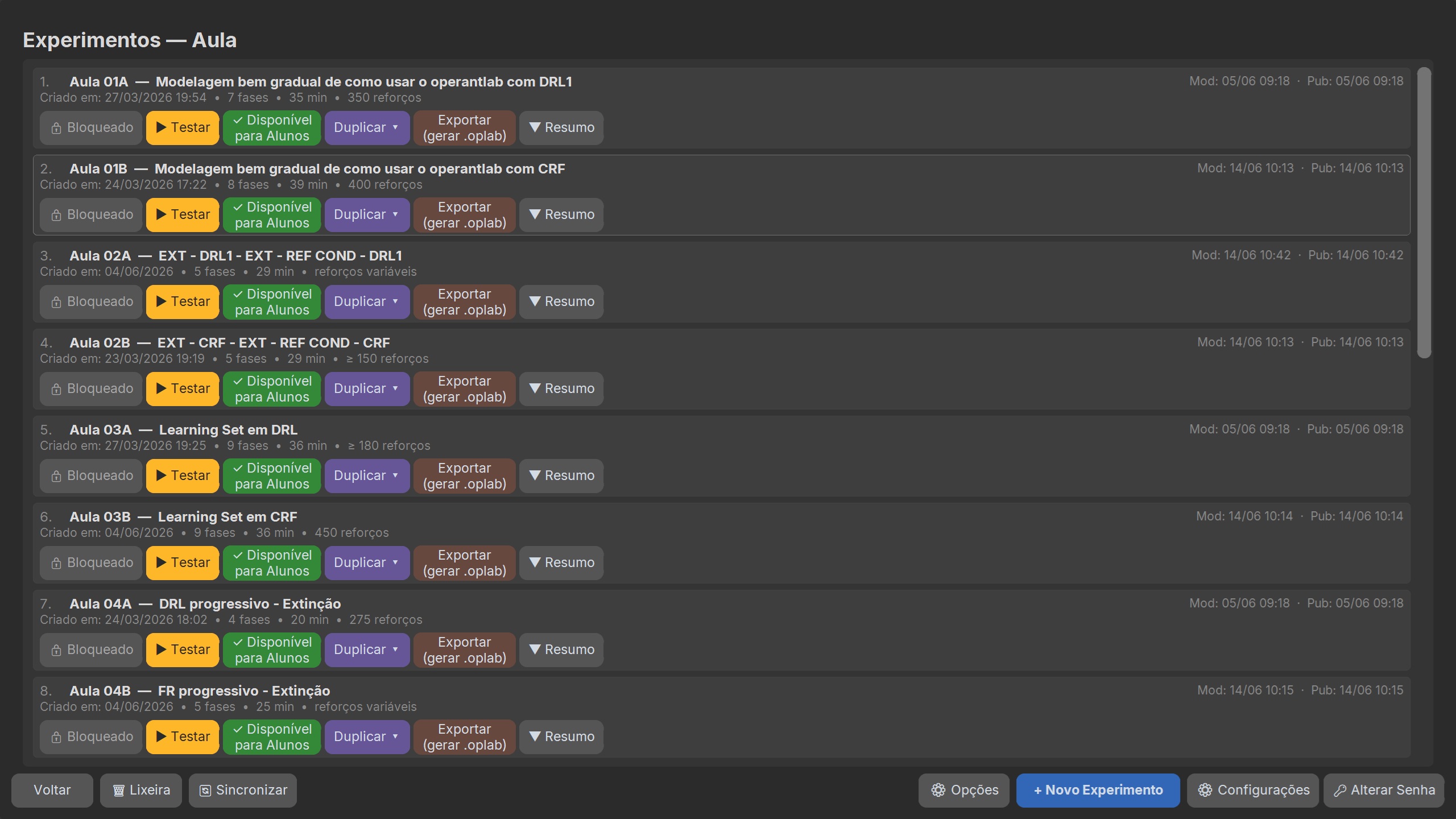
7 ready-made lessons — the classic experiments plus Fading and Behavioral Variability.

OperantLab™ comes with pre-configured experiments — just open, run and discuss the data with your class.

Lesson 01

Introduction to OperantLab

Introduces the software gradually — starts with one stimulus and adds one per phase until reaching 7 stimuli, always under CRF.

CRFDISCRIMINATION8 PHASES
Lesson 02

Acquisition, Extinction and Conditioned Reinforcement

Contrasts CRF acquisition with two extinction periods — the second with conditioned reinforcement (points) — followed by a return to CRF. Demonstrates the role of the conditioned reinforcer in maintaining behavior.

CRFEXTCOND. REINF.CRF5 PHASES
Lesson 03

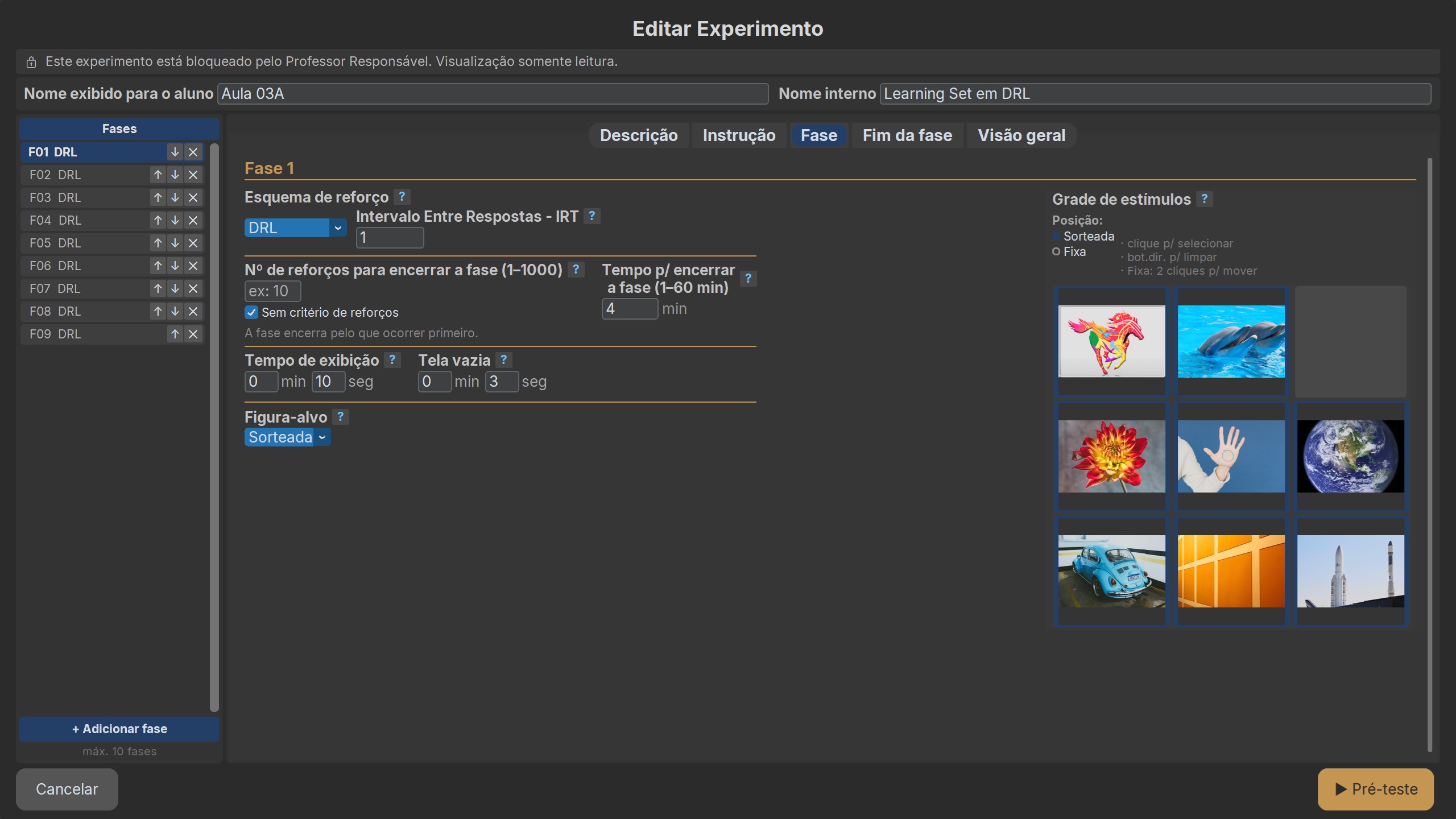
Learning Set — Learning to Learn

Series of 9 discrimination problems under CRF, each with a new correct stimulus. Errors decrease across trials within each problem, demonstrating the learning set effect.

CRFDISCRIMINATION9 PHASES
Lesson 04

Progressive Fixed Ratio and Extinction

The requirement rises progressively from CRF to FR2, FR3 and FR4, until extinction. Demonstrates resistance to extinction following a fixed-ratio schedule.

CRFFREXT5 PHASES
Lesson 05

Stimulus Generalization

Discrimination training under FR3 followed by extinction with new stimuli. Demonstrates how stimulus control established with one set of stimuli generalizes to novel ones.

FREXTGENERALIZATION2 PHASES
Lesson 06

Fading — Errorless Transfer

The SD is gradually faded across 6 phases of FR3. Demonstrates how stimulus control can be transferred with zero errors (errorless learning).

FRFADING6 PHASES
Lesson 07

Behavioral Variability with LAG

The LAG grows progressively from 1 to 4, requiring increasingly varied responses. Demonstrates the selection of variability by consequences.

LAGVARIABILITY4 PHASES
Download and use these experiments WhatsApp
Screenshots

Screenshots

Click to enlarge.

Version history

Actively evolving software.

v2.1.4 — September 2026

  • New color blindness accessibility option: a 5-profile selector (Default, Deuteranopia, Protanopia, Tritanopia, Monochrome) on the profile screen, with a live sample so you can choose based on what you can actually tell apart
  • Interface colors adjusted per profile at the points that collided under color blindness (sync warnings, license, history, K1 security key, experiment selection screen), without changing the experiments' stimuli
  • The chosen color profile is now recorded in the session's CSV
  • Analyzer: charts now also follow the chosen color profile
  • Fixed conditioned reinforcement performance (spiral, floating "+1" and sound): very fast clicks in CRF would drop points with all 4 effects on; it now keeps up normally
  • Editor: fixed several cases where the figure gallery's mini-grid would "jump"/change size on click (selecting a thumbnail, moving a figure in Fixed Position, the selected-count label)
  • Editor: in Fixed Position mode, fixed the gallery opening with an empty preview, and marking 2+ new figures only saving the first one, silently discarding the rest
  • Editor: Save and Pre-test now refuse when two different figures share the same file name in different folders, instead of the grid silently showing only one of them (and the duplicate-figure-name message on publish now respects the selected language)

v2.1.3 — September 2026

  • Startup screen (splash): shows loading progress as soon as it opens, instead of a blank screen for a moment
  • New "Recording" tab in the editor: response frequency (absolute, cumulative and per-minute) right in the editor, without opening the Analyzer
  • Conditioned reinforcement configurable per phase (spiral, sound and/or brightness), with 15 sounds at the same perceived volume; the student's volume now starts lower (the pre-test stays at normal volume)
  • Editor: confirmation before deleting a phase; "Keep from previous phase" now checks that the figures actually exist
  • Editor: "Save" and "Save and exit" are now separate buttons
  • Machine identity: fixed a case where a cloned image (batch installation) repeated another machine's identity; each machine now separates on its own
  • The app now prevents opening two copies at once — the window already open comes to the front
  • Fixed: in some cases the app would not reopen on its own after activating the license
  • Publishing an experiment without the institution's security key (K1) is now refused with a warning, instead of failing with no explanation
  • An unpublished edit no longer risks being overwritten by another machine's sync
  • History: date and time now show in the local time zone, no longer UTC
  • Batch installation: the security key (K1) comes back on its own once the network drops and returns

v2.1.2 — September 2026

  • Institutional automatic updates: the Responsible Professor turns on automatic updates per campus, and the IT Technician can decide this for their own machine. Once on, the app downloads the new version and starts the installation on its own; Windows still asks for administrator confirmation before installing — but no one needs to go machine by machine running the installer by hand
  • Cloud results: two sessions from the same student in the same month could silently overwrite one another. Now each session keeps its own file, even when the experiment is repeated
  • Cloud file name: fixed a case where the student's ID appeared in plain text in the file name saved on the server
  • Results-saved screen: in some cases (pre-test, or with cloud upload turned off) the Exit button could stop responding, leaving the student stuck on the screen. Fixed
  • Excel import tip: when saving or downloading the results file, the app now explains how to open it correctly in Excel — the most common issue is the column separator
  • Participant name: limited to 60 characters, with letters, numbers and a few common symbols. Prevents a failure when saving the file with very long names
  • Upload queue: if the results folder is on a network or flash drive that goes offline, the pending file is no longer discarded; it waits for the folder to come back
  • Security key enrollment: in a batch installation, the key now arrives on its own once the network is back, without needing to leave and return to the screen
  • History: without internet, the screen could incorrectly show a student's first session. Fixed

v2.1.1 — August 2026

  • Student results: files no longer have to go to the Documents folder. In labs where the user profile is wiped at every login, the app writes outside the profile; and if the folder set by IT refuses writing, it finds a safe place on its own instead of losing the file
  • Upload notice: at the end of the session the student sees whether the file reached the cloud, and the message explains why when it does not. Before, a network failure went unnoticed
  • Automatic retry: anything that did not upload for lack of internet goes up on its own within a minute, with the app open, and the screen updates by itself. Before, you had to close and reopen the program
  • Session records: the session list the instructor follows also got a queue. Sessions run offline reached the results file but disappeared from that list; now they wait for the network to come back
  • Session date: sessions run at night showed the next day's date. Now it shows the computer's date
  • Batch installation: signing in as technician while the key enrollment was under way could freeze the program. Fixed
  • Key enrollment: the window now also accepts the Technician password, not only the Responsible Professor's — during a batch installation it is the technician who is at the machine. Generating the key still requires the Responsible Professor
  • Sample experiments: they now have a fixed identifier, the same in every installation. There is no longer any need to publish the samples from a single machine, and the same experiment stops appearing twice when a new machine joins the lab

v2.1.0 — August 2026

  • Encryption key: a new computer receives the institution's key over the network, on its own, seconds after being opened — the technician opens an enrollment window on a computer that already has the key and the rest sort themselves out, with no USB drive and no typing the recovery code on each one. The key travels sealed for each computer; the server still cannot open it
  • Warning when the key is missing: a computer without the institution's key says so as soon as you sign in — previously it stayed silent, and participant data quietly stopped being uploaded to the cloud
  • Institutional installation: the app can now be installed in Program Files, as IT policies require. Experiments, figures and settings are now kept in the user data folder instead of inside the program folder — IT does not have to grant special permissions on any computer
  • Update: figures and instructions created by the teacher are no longer replaced by same-named ones shipped with the new version
  • Desktop shortcut: appears for every user of the computer — previously, when an administrator ran the installation, the icon ended up only on their own desktop

v2.0.8 — August 2026

  • Sync: two experiments with the same name published from different machines no longer enter an endless download loop — previously the experiment's content alternated between versions on every sync, and the “received from another machine” notice never went away
  • Editor: the Phase and End of phase tabs open again with the app in English or Spanish — previously the editor was unusable outside Portuguese
  • English and Spanish: text that still appeared in Portuguese was translated in the editor, the history and Mini — including the Environment and Period filters, the phase summary and the study status
  • New installation: of the sample classes, only 01A, 01B, 02A and 02B start out visible to the student — the rest stay hidden for the teacher to release as the term goes on, and all start locked for editing
  • Editor: the conditioned reinforcement on/off switch now scales with the screen — on large screens it was too small to see

Earlier versions (v1.0 – v2.0.7): Publication scope (campus-only or institution-wide) with Responsible Teacher approval; installer digitally signed with an EV certificate (no Windows SmartScreen warning); Responsible Teacher with class-experiment locking and e-mail password recovery; OperantLab Mini (integrated online data collection, web researcher panel with 8 tabs, per-campus limits, “Available on Mini” button), redesigned experiment editor with 4 tabs and stimulus gallery, Fingerprint v2 (BIOS UUID + CPU ID), OTP email activation, LAG schedule, full CSV export, AES-256 encryption, cross-machine sync, and 30+ bug fixes. View all releases on GitHub ↗

Download

7-day free trial. All features included.

Install, configure your experiments, run them with your class. No credit card, no remote installation — the software runs entirely on the lab machine.

1

Download the trial

Choose the version for your system (Windows or Linux) and download directly. Immediate access to all 11 schedules, no time limit or feature restrictions.

2

Use it for 7 days

Full access to all 11 schedules, all roles, data export, didactic examples. No limitations. No credit card required.

3

Acquire a license

At the end of the trial, the software will guide you through activation. The license is bound to the machine's hardware. Request as many licenses as your institution needs.

Available downloads

Get it from Microsoft Store

Microsoft Store · v2.1.3

🪟 Windows — v2.1.4 · Installer
🐧 Linux OperantLab™ — v2.1.4 · AppImage

Requires a glibc 2.35+ Linux distribution (Ubuntu 22.04+, Debian 12+, Fedora 36+).

Windows alternative: Instalador_OperantLab_v2.1.4.exe

Linux alternative: OperantLab_linux_v2.1.4.tar.gz

All versions: github.com/operantlabsoftware/operantlab-releases

OperantLab Image Converter — free utility to convert images to the correct format (245×165 px) used in experiments. No installation needed — download and run.

Image Converter🪟 Windows — installer Image Converter🪟 Windows — standalone .exe
Image Converter🐧 Linux — AppImage Image Converter🐧 Linux — .tar.gz
WhatsApp support Institutional licenses
Licensing

Packages by laboratory

Each license covers one machine. Choose the package that matches your laboratory size. Prices are in Brazilian Reais (R$), the currency of Brazil — the R$ amount shown is the official, fixed price. The US$ figures below are an approximate reference only, converted at the Central Bank of Brazil's PTAX rate on Sep 15, 2026 (US$1 ≈ R$5.15); your actual cost in dollars will vary with the exchange rate on the day of payment.

Individual
1
license included
Semi-annual
R$ 331
≈ US$ 64
/semester upfront
R$ 55.17 per month
Annual · save 10%
R$ 599
≈ US$ 116
/year upfront
R$ 49.92 per month
  • Instructor support
  • Teaching materials
Request a quote
Essential
8
licenses included
Semi-annual
R$ 1.270
≈ US$ 247
/semester upfront
R$ 26.46 per license/mo
Annual · save 10%
R$ 2.299
≈ US$ 446
/year upfront
R$ 23.95 per license/mo
  • Instructor support
  • Teaching materials
  • Assisted implementation
Request a quote
Basic
15
licenses included
Semi-annual
R$ 1.885
≈ US$ 366
/semester upfront
R$ 20.94 per license/mo
Annual · save 10%
R$ 3.399
≈ US$ 660
/year upfront
R$ 18.88 per license/mo
  • Instructor support
  • Reference materials
  • Assisted implementation
Request a quote
Standard
30
licenses included
Semi-annual
R$ 3.073
≈ US$ 597
/semester upfront
R$ 17.07 per license/mo
Annual · save 12%
R$ 5.399
≈ US$ 1,049
/year upfront
R$ 15.00 per license/mo
  • Instructor support
  • Reference materials
  • Assisted implementation
Request a quote
Extended
50
licenses included
Semi-annual
R$ 4.585
≈ US$ 890
/semester upfront
R$ 15.28 per license/mo
Annual · save 16%
R$ 7.699
≈ US$ 1,495
/year upfront
R$ 12.83 per license/mo
  • Instructor support
  • Reference materials
  • Assisted implementation
Request a quote
Institutional
75
licenses included
Semi-annual
R$ 5.395
≈ US$ 1,048
/semester upfront
R$ 11.99 per license/mo
Annual · save 19%
R$ 8.699
≈ US$ 1,689
/year upfront
R$ 9.67 per license/mo
  • Instructor support
  • Reference materials
  • Assisted implementation
Request a quote

Assisted implementation comes with every plan from 2 machines up.

Need a different number of machines? Contact us for a custom quote.

Documentation

System manuals

All manuals in PDF, ready to read and print. Each profile has its own — or download the Complete Manual with all three together.

📘 Student Manual How to use the system, interpret results and export to Excel Download PDF ↓ 📕 Professor Manual Create experiments, configure schedules, monitor sessions and analyse CSV data Download PDF ↓ 📙 IT Technician Manual Installation, licence activation (OTP and batch password), updates and troubleshooting Download PDF ↓ 📚 Complete Manual All three manuals in a single document — ideal for coordinators and IT Download PDF ↓
Contact

Let's talk about your program.

Coordinators and instructors: we respond within two business days with installer and guidance.

We are available to present the system in faculty meetings, give a live demonstration for your class, or answer technical questions about integration with your institution's computer lab.
Instagram
Start a conversation on WhatsApp
Business hours
Monday–Friday · 9 AM to 6 PM (Brasília, BRT / UTC-3)